Getting started
Who Sendall is for
Anyone who needs to pay a list of Stellar addresses at once: airdrops, contributor payouts, refunds, reward distributions. If you'd otherwise be signing the same payment transaction 50 or 200 times in a row, Sendall collapses that into one signature.
Starting a batch without a wallet
You do not need a wallet to build a batch. Open New batch and you land straight on the Prepare screen with an empty batch already created. Paste your recipients as destination,amount (a third, optional column adds a memo), or upload a CSV with a destination, amount, and optional memo column.
This batch is a draft, scoped to your browser session, not to any wallet. You can leave, come back, and keep editing it. Sendall only asks for a wallet the moment you're ready to sign, on the Confirm screen. That's a deliberate choice: browsing, testing the CSV format, or building a batch in advance shouldn't require connecting anything.
Starting a batch from a saved list
If you've saved recipients under Address lists, you can start a batch from a list directly. This path does require a connected wallet up front, since the list itself is tied to your wallet.
Signing and sending
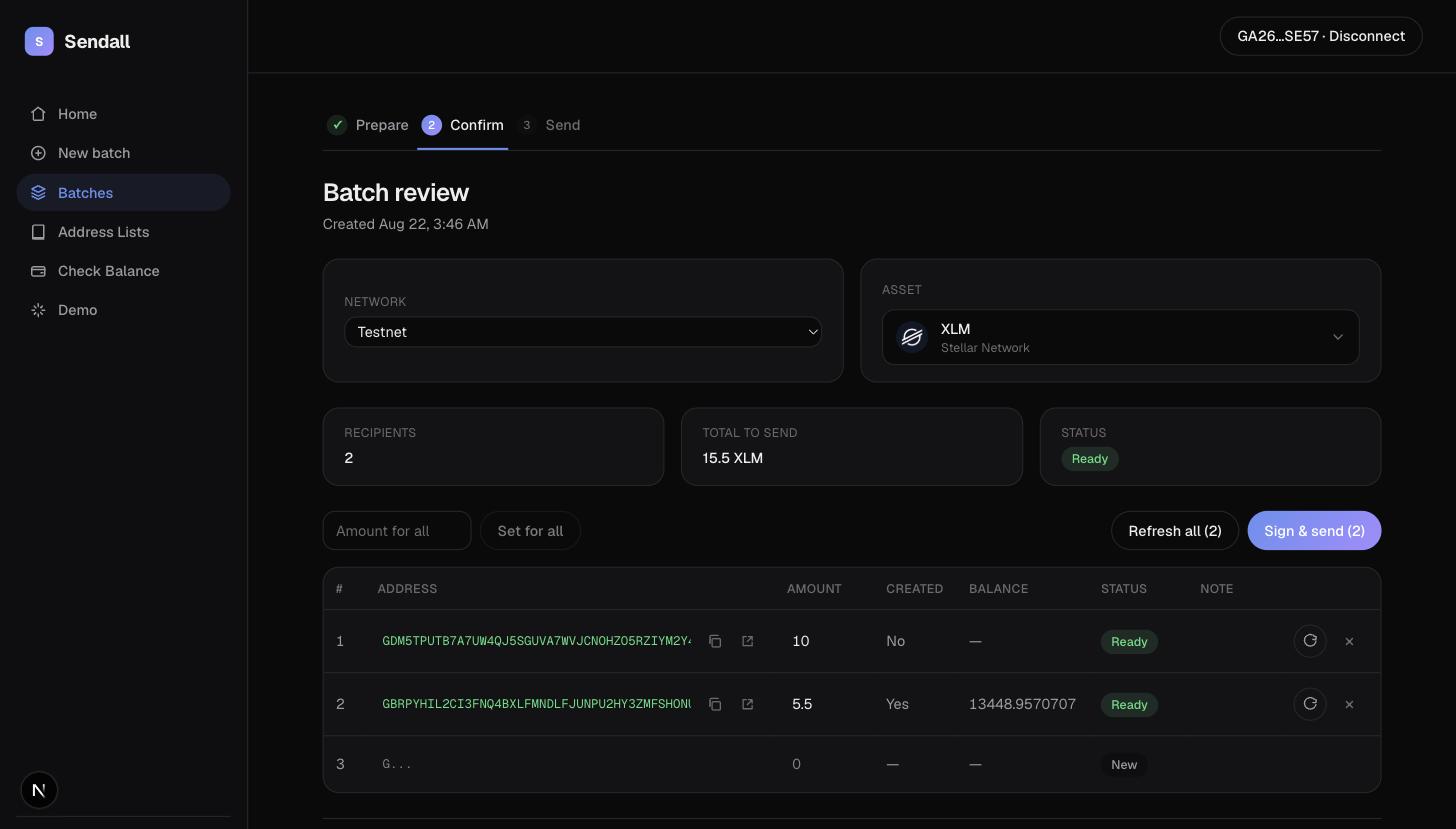
On the Confirm screen, review the recipient table. Each row shows whether the address is valid, whether the account exists on the network, its current balance, and (for issued assets) whether it holds a trustline with room for the payment. Rows that fail any check are flagged; fix them inline or remove the row.
When every recipient you want to pay is marked Ready, press Sign & send. If you're not connected yet, Sendall prompts a wallet connection first (a SEP-53 sign-in message, not a transaction, so it costs nothing) and then claims the batch as yours. Signing itself happens once, in your wallet, regardless of how many recipients are in the batch.
Picking a network and an asset
Sendall works on both Stellar testnet and the public network. Switch networks from the batch's Network field before you add recipients, since account and trustline checks run against whichever network is selected.
By default a batch pays native XLM. To pay an issued asset (USDC, EURC, or any other SEP-41 asset), pick it from the Asset field. Sendall ships icons and verified issuers for a short list of well-known assets; anything else you type in by code and issuer address, and Sendall looks up its icon through the issuer's stellar.toml if one is published.
Where to go next
- How a batch moves through Sendall covers the full lifecycle, including what happens when a recipient fails partway through.
- Batches documents the Prepare, Confirm, and Send screens in detail.
- Demo mode runs a real, small batch on testnet with a guided walkthrough, useful if you want to see the whole flow before committing real funds.